BGC, Makati, and Pasig Delivery Routes: Battery Swapping vs Home Charging on a Rental E-Bike
Route-by-route guide for GrabFood and foodpanda riders in BGC, Makati, and Pasig comparing battery swapping and home charging costs on rental e-bikes.
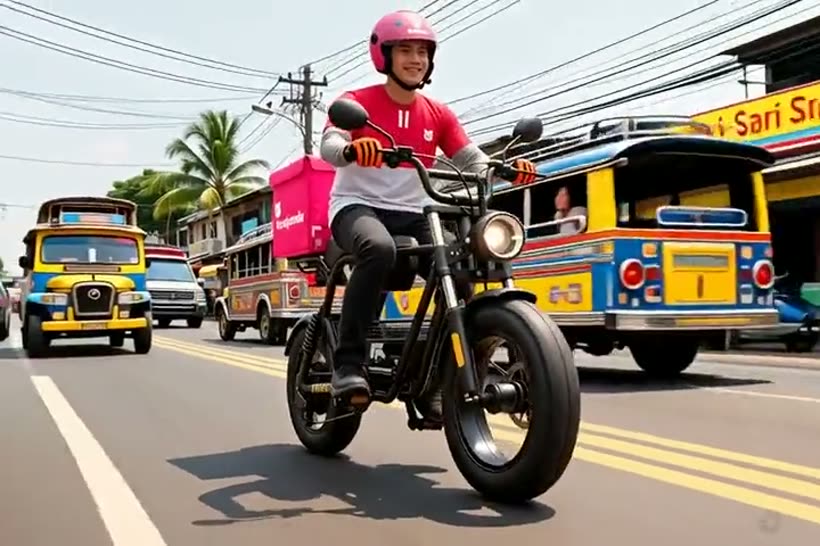
Why Route Geometry Decides Your Charging Strategy
BGC, Makati, and Pasig are not one riding environment. BGC rewards short, dense hops with frequent stops, Makati CBD punishes riders with steep parking ramps and heavy Ortigas-bound traffic, and Pasig stretches your route along C-5 and inner barangay roads where a single detour can add four kilometers.
That geometry determines how you spend battery. Stop-and-go Makati traffic drains a pack faster than steady BGC loops because every acceleration from a red light pulls peak current. Riders on long Ortigas and Pasig runs need predictable range, which is why swapping fits better than a single overnight charge that may not cover an eleven-hour day.
- BGC loops favor short bursts with many stops; keep a second pack accessible.
- Makati CBD traffic accelerates battery drain through constant restart cycles.
- Pasig and C-5 routes need full-pack range planning before accepting far orders.
- Map your usual cluster before choosing daily versus weekly rental.
Battery Swapping Versus Home Charging: The Real Difference
Home charging is the cheapest energy per kilometer if your home has a stable, grounded outlet and you can charge overnight. The catch is time: a depleted delivery pack typically needs three to five hours for a full charge, which fits night charging but not a lunch-to-dinner double shift without a second battery on standby.
Swapping flips the economics. You trade a small convenience premium for near-zero downtime, so a rider can stay online through the 11 a.m. to 1 p.m. and 6 p.m. to 9 p.m. peaks that carry most of the day's earnings. For full-time GrabFood and foodpanda riders, recovering even one peak hour often pays for the swap premium.
- Home charging: lowest per-kilometer cost, highest downtime risk.
- Swapping: instant pack change, ideal for split peak-hour shifts.
- Confirm your outlet is grounded and not shared with high-draw appliances.
- Never charge indoors overnight without smoke detection nearby.
Matching Rental Plans to Your Shift Pattern
EBike PH pricing is simple: ₱200 per day, ₱1,200 per week, and ₱4,500 per month, with maintenance support included. The daily plan suits part-timers testing delivery work or riders covering weekend peaks, while the weekly plan fits a steady five-day schedule around a day job or school.
The monthly plan is the workhorse for full-time riders running BGC-Makati-Pasig clusters six days a week. Because servicing and wear items sit with the rental provider, a rider avoids the sudden repair bills that can wipe out a week of earnings — a real risk when you own a bike and a motor controller fails mid-shift.
- ₱200/day: trial shifts, weekend coverage, or backup riders.
- ₱1,200/week: steady five-day riders with predictable clusters.
- ₱4,500/month: full-time riders who want maintenance included.
- Ask how swap credits are handled if you upgrade mid-month.
The Cost-Per-Order Math That Actually Matters
Gross daily rental looks small next to a full-time income, but the number that matters is pesos per delivered order. A rider completing 18 orders on a ₱200 day spends about ₱11 per order before energy; downtime pushes that higher because fixed rental cost spreads across fewer deliveries.
Home charging reduces energy cost but can cost you two or three peak orders if a pack is not ready. At typical Metro Manila delivery fares, losing three peak orders can exceed the entire day's charging savings. Run the math on your own average orders per hour before switching strategies.
- Divide daily rental by completed orders to get fixed cost per order.
- Count missed peak-hour orders as lost revenue, not just downtime.
- Track weekly swap or charging spend against weekly gross earnings.
- Review the ratio after every pay cycle and adjust the plan.
Road Rules, Safety, and Maintenance Support
Light electric vehicles used for delivery operate under LTO and MMDA guidance and local government rules that vary by city. Riders should keep documentation on hand, use designated bike lanes where provided, wear a helmet, and follow barangay or city ordinances on where e-bikes may travel along major corridors.
Maintenance support is the quiet advantage of renting. Brake pads, tires, and wiring degrade quickly under daily delivery loads, and a provider that handles servicing keeps the bike roadworthy and safe. Check lights, brakes, and tire pressure before every shift, and report faults immediately rather than riding a compromised machine.
- Carry rental and rider documents; rules differ across BGC, Makati, and Pasig.
- Use bike lanes and follow local light-EV ordinances on major roads.
- Report brake, tire, or wiring issues to maintenance support early.
- Do a 60-second pre-shift check of lights, brakes, and pressure.
FAQ
Is battery swapping or home charging cheaper for GrabFood riders in Metro Manila?
Home charging is cheaper per kilometer, but swapping protects peak-hour earnings. If home charging forces you offline for three or more peak orders, swapping usually nets more per day despite the higher energy cost.
How much does an EBike PH delivery rental cost?
Plans are ₱200 per day, ₱1,200 per week, and ₱4,500 per month, with maintenance support included. Choose based on how many days per week you ride and whether you need swap access.
Can I use a rental e-bike for foodpanda and GrabFood deliveries in BGC, Makati, and Pasig?
Yes, riders commonly use light electric bikes for short-radius food delivery in these areas. Follow LTO and MMDA guidance, local city ordinances, and use bike lanes where available.
What should I check before every delivery shift?
Check brakes, tire pressure, lights, and battery charge level. Report any wiring, brake, or motor issue to maintenance support before riding, and carry your rental documents.
Related rider pages
Use these core pages to compare rental, rent-to-own, service area, and booking details after reading this guide.